Containerd 镜像加速
之前分享过Docker下载的镜像是无法在以containerd为容器运行时的Kubernetes集群运行的,同理
Docker配置的加速器在 containerd 上也完全不起作用!
为什么?
containerd 和 Docker 的镜像配置方式不同,Docker 的配置 daemon.json 不会被 containerd 读取,containerd的配置文件是/etc/containerd/config.toml。
如果不配置 containerd 的镜像加速器,拉 Docker Hub 镜像会非常慢,国内甚至无法拉取镜像。
下面就教大家在containerd配置多个加速器,其实跟docker的加速器可以是一样的,只是配置的位置和方式有点差别。
1 修改containerd配置文件
可以把多个国内镜像源写在 endpoint 数组里,containerd 会按顺序尝试,保证拉镜像最快。
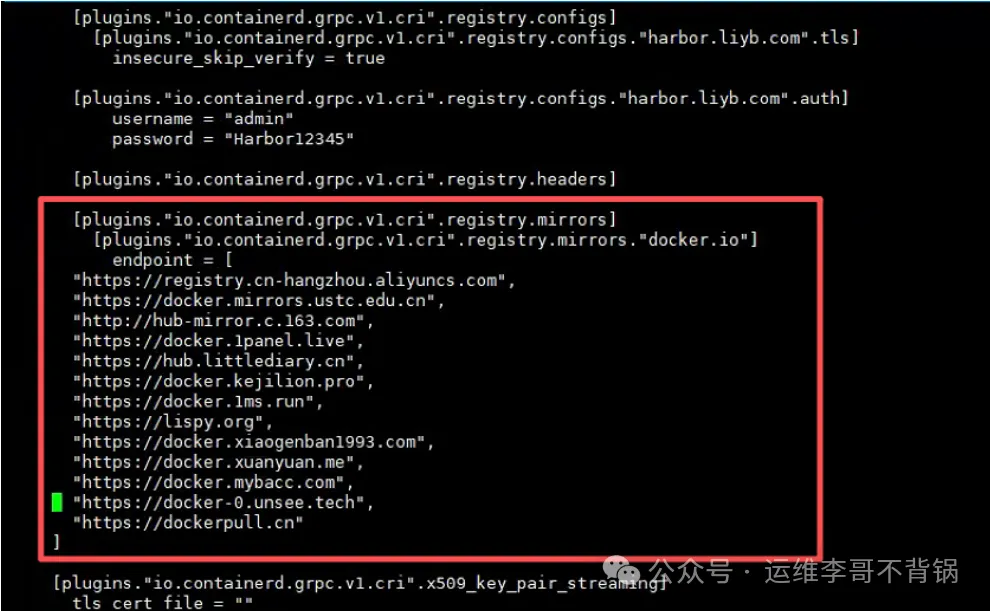
vim /etc/containerd/config.toml在 [plugins."io.containerd.grpc.v1.cri".registry]中添加镜像加速器
[plugins."io.containerd.grpc.v1.cri".registry.mirrors."docker.io"]
  endpoint = [
    "https://registry.cn-hangzhou.aliyuncs.com",
    "https://docker.mirrors.ustc.edu.cn",
    "http://hub-mirror.c.163.com",
    "https://docker.1panel.live",
    "https://hub.littlediary.cn",
    "https://docker.kejilion.pro",
    "https://docker.1ms.run",
    "https://lispy.org",
    "https://docker.xiaogenban1993.com",
    "https://docker.xuanyuan.me",
    "https://docker.mybacc.com",
    "https://docker-0.unsee.tech",
    "https://dockerpull.cn"
  ]
这样配置后,containerd 拉 Docker Hub 镜像就会自动走国内加速器,只要加速器可用,速度就会飞起来。
2 重启 containerd
systemctl daemon-reload
systemctl restart containerd
3 测试加速是否生效
1)使用crictl下载镜像
[root@k8s-master ~]# crictl pull nginx:1.27注意:必须用 crictl 或 Kubernetes 拉镜像测试,ctr 命令不会走加速器。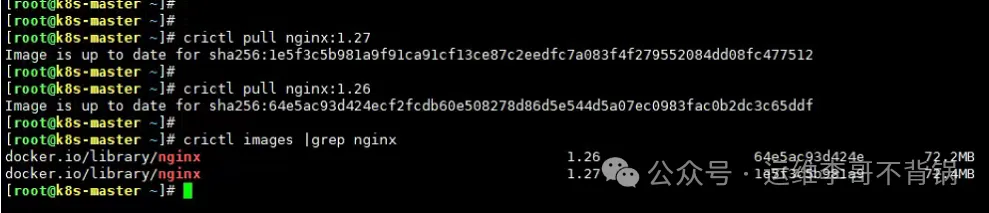
2)使用 kubectl 直接运行镜像
kubectl run nginx-test --image=nginx:1.27
kubectl get pods
kubectl logs nginx-test
需要注意的是:如果直接kubectl运行,需要在K8S集群每个节点都配置containerd,不然调度到没配置的节点会出现拉取镜像失败
如果后续有新的加速器都可以通过上述相同方式加入到containerd配置文件中。这个方法适用于所有基于 containerd 的 Kubernetes 集群,包括 k3s、k8s 原生集群等。
作者:Jeebiz 创建时间:2025-12-02 19:00
最后编辑:Jeebiz 更新时间:2025-12-10 15:39
最后编辑:Jeebiz 更新时间:2025-12-10 15:39