Apereo CAS :自定义登录成功后的返回信息
Apereo CAS 与第三方单点认证成功后,默认返回的信息比较少或者可用的信息不多,使得第三方在编写接入的逻辑代码时,会比较不便。因此,我们需要改造 Apereo CAS 登录方法,追加 扩展信息
- 1、修改 Apereo CAS 的 OAuth2.0 获取认证用户信息方法
/oauth2.0/profile,追加与登录接口返回相同的 扩展信息
修改 Apereo CAS 的 OAuth2.0 获取认证用户信息方法
1、引入 Maven 依赖
Apereo CAS 当前主要是采用 Overlay 的方式进行扩展。要想找到验证相关的对象,需要将相关的依赖项添加到项目的 Maven pom.xml 文件中:
<dependency>
    <groupId>org.apereo.cas</groupId>
    <artifactId>cas-server-support-oauth</artifactId>
    <version>${cas.version}</version>
</dependency>
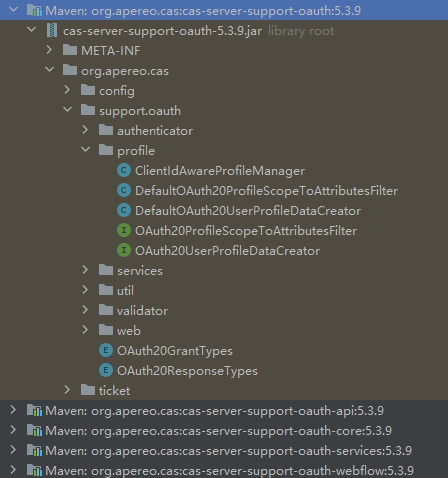
然后找到 cas-server-support-oauth,展开包结构,我们可以看到如下图所示效果:
2、分析源码
首先从源码查找 OAuth2.0 获取认证用户信息方法 /oauth2.0/profile
搜索 /oauth2.0 关键字,可查询到 OAuth20Constants.BASE_OAUTH20_URL、OAuth20Constants.PROFILE_URL
继续搜索 OAuth20Constants.PROFILE_URL 可找到 OAuth20UserProfileEndpointController 的 handleRequest 方法
@GetMapping(path = OAuth20Constants.BASE_OAUTH20_URL + '/' + OAuth20Constants.PROFILE_URL, produces = MediaType.APPLICATION_JSON_VALUE)
public ResponseEntity<String> handleRequest(final HttpServletRequest request, final HttpServletResponse response) throws Exception {
    response.setContentType(MediaType.APPLICATION_JSON_VALUE);
    // 创建 J2EContext
    final J2EContext context = Pac4jUtils.getPac4jJ2EContext(request, response);
    // 从请求中获取 accessToken
    final String accessToken = getAccessTokenFromRequest(request);
    if (StringUtils.isBlank(accessToken)) {
        LOGGER.error("Missing [{}] from the request", OAuth20Constants.ACCESS_TOKEN);
        return buildUnauthorizedResponseEntity(OAuth20Constants.MISSING_ACCESS_TOKEN);
    }
    // 获取 accessToken 匹配的 accessTokenTicket
    final AccessToken accessTokenTicket = this.ticketRegistry.getTicket(accessToken, AccessToken.class);
    // 判断 accessTokenTicket 是否为null
    if (accessTokenTicket == null) {
        LOGGER.error("Access token [{}] cannot be found in the ticket registry.", accessToken);
        return expiredAccessTokenResponseEntity;
    }
    // 判断 accessTokenTicket 是否过期
    if (accessTokenTicket.isExpired()) {
        LOGGER.error("Access token [{}] has expired and will be removed from the ticket registry", accessToken);
        this.ticketRegistry.deleteTicket(accessToken);
        return expiredAccessTokenResponseEntity;
    }
    // 判断登出配置中是否要删除访问token
    if (casProperties.getLogout().isRemoveDescendantTickets()) {
        final TicketGrantingTicket ticketGrantingTicket = accessTokenTicket.getTicketGrantingTicket();
        if (ticketGrantingTicket == null || ticketGrantingTicket.isExpired()) {
            LOGGER.error("Ticket granting ticket [{}] parenting access token [{}] has expired or is not found", ticketGrantingTicket, accessTokenTicket);
            this.ticketRegistry.deleteTicket(accessToken);
            return expiredAccessTokenResponseEntity;
        }
    }
    // 更新 accessTokenTicket 使用情况
    updateAccessTokenUsage(accessTokenTicket);
    // 从 accessTokenTicket 和 J2EContext 创建要返回的属性Map
    final Map<String, Object> map = this.userProfileDataCreator.createFrom(accessTokenTicket, context);
    final String value = this.userProfileViewRenderer.render(map, accessTokenTicket);
    return new ResponseEntity<>(value, HttpStatus.OK);
}
以上代码中,比较重要的一段是:
// 从 accessTokenTicket 和 J2EContext 创建要返回的属性Map
final Map<String, Object> map = this.userProfileDataCreator.createFrom(accessTokenTicket, context);
跟踪 userProfileDataCreator 的 createFrom 方法:
@Override
@Audit(action = "OAUTH2_USER_PROFILE_DATA",
    actionResolverName = "OAUTH2_USER_PROFILE_DATA_ACTION_RESOLVER",
    resourceResolverName = "OAUTH2_USER_PROFILE_DATA_RESOURCE_RESOLVER")
public Map<String, Object> createFrom(final AccessToken accessToken, final J2EContext context) {
    // 从 accessTokenTicket 和 J2EContext 创建要返回的 Principal
    final Principal principal = getAccessTokenAuthenticationPrincipal(accessToken, context);
    final Map<String, Object> map = new HashMap<>();
    map.put(OAuth20UserProfileViewRenderer.MODEL_ATTRIBUTE_ID, principal.getId());
    map.put(OAuth20UserProfileViewRenderer.MODEL_ATTRIBUTE_ATTRIBUTES, principal.getAttributes());
    finalizeProfileResponse(accessToken, map, principal);
    return map;
}
跟踪 getAccessTokenAuthenticationPrincipal 方法:
protected Principal getAccessTokenAuthenticationPrincipal(final AccessToken accessToken, final J2EContext context) {
    // 查找 accessToken 匹配的 Service
    final Service service = accessToken.getService();
    // 通过 Service 查找到 RegisteredService
    final RegisteredService registeredService = this.servicesManager.findServiceBy(service);
    // 从 accessToken 的认证对象 获取 Principal
    final Principal currentPrincipal = accessToken.getAuthentication().getPrincipal();
    LOGGER.debug("Preparing user profile response based on CAS principal [{}]", currentPrincipal);
    // 使用 scopeToAttributesFilter 过滤 Principal 属性,并返回 Principal对象
    final Principal principal = this.scopeToAttributesFilter.filter(accessToken.getService(), currentPrincipal,
        registeredService, context, accessToken);
    LOGGER.debug("Created CAS principal [{}] based on requested/authorized scopes", principal);

    return principal;
}
跟踪 scopeToAttributesFilter.filter 方法, 默认是 DefaultOAuth20ProfileScopeToAttributesFilter:
@Slf4j
public class DefaultOAuth20ProfileScopeToAttributesFilter implements OAuth20ProfileScopeToAttributesFilter {
}
默认的过滤器是直接返回原 Principal
default Principal filter(final Service service, final Principal profile,
                         final RegisteredService registeredService, final J2EContext context,
                         final AccessToken accessToken) {
    return profile;
}
从上面的代码逻辑分析可得出比较好的改造思路是在 OAuth20ProfileScopeToAttributesFilter 实现中进行返回属性的修改。
4、实施改造方案
自定义 OAuth20ProfileScopeToAttributesFilter 实现类,实现从Redis缓存中获取自定义属性
import com.tianyin.service.util.BizRedisKey;
import org.apereo.cas.authentication.principal.Principal;
import org.apereo.cas.authentication.principal.Service;
import org.apereo.cas.services.RegisteredService;
import org.apereo.cas.ticket.accesstoken.AccessToken;
import org.pac4j.core.context.J2EContext;
import org.springframework.data.redis.core.RedisTemplate;

import java.util.Map;

public class MyOAuth20ProfileScopeToAttributesFilter implements OAuth20ProfileScopeToAttributesFilter {

    private RedisTemplate userRedisTemplate;

    public MyOAuth20ProfileScopeToAttributesFilter(final RedisTemplate userRedisTemplate) {
        this.userRedisTemplate = userRedisTemplate;
    }

    @Override
    public Principal filter(Service service, Principal profile, RegisteredService registeredService, J2EContext context, AccessToken accessToken) {

        // 1、门户登录成功后,会记录登录信息到缓存中(此处代码很重要,是实现全局统一认证信息的一部分)
        String rdsKey = BizRedisKey.USER_LOGIN_INFO.getKey(profile.getId());
        // 1.1、从缓存获取登录信息
        Map<String, Object> loginInfoMap = userRedisTemplate.opsForHash().entries(rdsKey);
        // 1.2、设置缓存中登录信息到 Principal
        profile.getAttributes().put("loginInfo", loginInfoMap);

        return profile;
    }

}
注入自定义 OAuth20ProfileScopeToAttributesFilter 到 Spring 上下文,覆盖默认实现:
import lombok.extern.slf4j.Slf4j;
import org.apereo.cas.configuration.CasConfigurationProperties;
import org.apereo.cas.support.oauth.profile.MyOAuth20ProfileScopeToAttributesFilter;
import org.apereo.cas.support.oauth.profile.OAuth20ProfileScopeToAttributesFilter;
import org.springframework.beans.factory.ObjectProvider;
import org.springframework.boot.context.properties.EnableConfigurationProperties;
import org.springframework.context.annotation.Bean;
import org.springframework.context.annotation.Configuration;
import org.springframework.data.redis.core.RedisTemplate;

@Configuration("oauthExtConfiguration")
@EnableConfigurationProperties(CasConfigurationProperties.class)
@Slf4j
public class CasOAuthExtConfiguration {

    @Bean(name = "profileScopeToAttributesFilter")
    public OAuth20ProfileScopeToAttributesFilter profileScopeToAttributesFilter(ObjectProvider<RedisTemplate> userRedisTemplate) {
        return new MyOAuth20ProfileScopeToAttributesFilter(userRedisTemplate.getIfAvailable());
    }

}
作者:Jeebiz 创建时间:2024-04-25 16:13
最后编辑:Jeebiz 更新时间:2024-05-06 17:48
最后编辑:Jeebiz 更新时间:2024-05-06 17:48